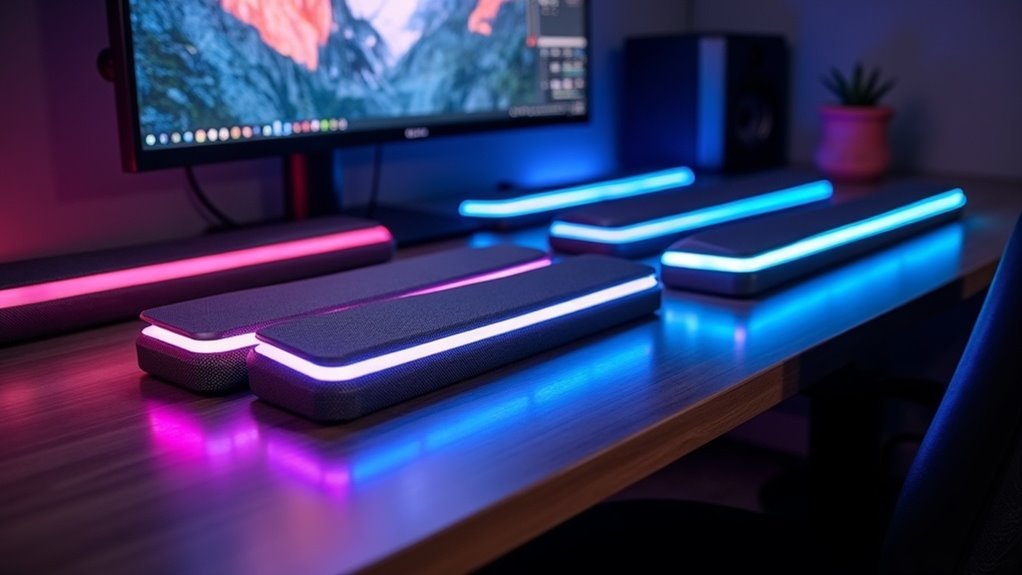
Looking to elevate your PC setup in 2025? The best RGB soundbars, like the Nylavee SK400 and Razer Leviathan V2 X, deliver stunning audio and vibrant lighting effects.
For a budget-friendly option, check out the Redragon GS516 or GS560, both offering impressive sound quality with customizable RGB features.
If you prefer more stylish designs, the Redragon GS515 won’t disappoint.
Want to know what factors to consider when selecting the perfect soundbar? Keep exploring for more insights!
USB Powered Computer Speakers with 6 Lighting Modes
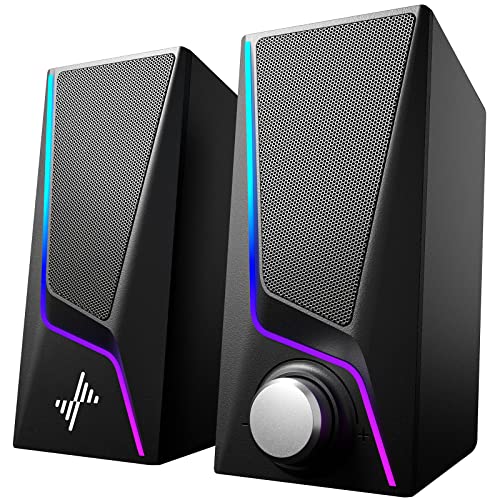
If you’re looking to enhance your home entertainment setup with immersive sound and sleek design, the Nylavee SK400 USB Powered Soundbar is an excellent choice. This soundbar delivers Hi-Fi stereo sound with rich bass, thanks to its dual-magnet speaker units and specialized ports. What sets it apart are the six lighting modes, allowing you to customize your experience with options like symphony or breathing effects. Setup is a breeze; just plug it in via USB and connect through the 3.5mm jack. While it excels indoors, keep in mind its compact design isn’t intended for portability. Enjoy a captivating audio-visual experience!
Best For: Those seeking affordable, high-quality sound and customizable lighting for gaming, movies, and general media consumption.
Pros:
- Hi-Fi stereo sound with deep bass and distortion-free audio.
- Six customizable lighting modes to enhance the visual appeal of your entertainment space.
- Easy plug-and-play setup with no drivers needed for quick installation.
Cons:
- Not portable or rugged, designed primarily for indoor use.
- Volume knob sensitivity may lead to unintended volume changes.
- Initial confusion with Bluetooth mode and potentially unclear instructions.
Redragon GS516 Computer Speaker, Bluetooth/USB Wired Soundbar

The Redragon GS516 Computer Speaker is an impressive soundbar option for gamers and casual users aiming to elevate their audio experience without overspending. This stylish soundbar is equipped with dual drivers that deliver satisfactory sound quality and features anti-magnetic technology to reduce static interference. With Bluetooth 5.0 and USB connectivity, it allows for seamless connections to a variety of devices. The RGB lighting adds a vibrant touch, offering six dynamic effects, although the touch-sensitive controls can sometimes be overly responsive. Weighing only 1.7 pounds and measuring 19.3 inches in width, it is ideal for conserving desk space. Priced around $40, it stands out as a solid choice, particularly for budget-conscious users.
Best For: Budget-minded gamers and casual users seeking an economical audio upgrade for their devices.
Pros:
- Satisfactory sound quality with dual drivers and anti-magnetic technology for clearer audio.
- Convenient connectivity options via Bluetooth 5.0 and USB, compatible with a range of devices.
- Striking RGB lighting with various effects enhances the overall aesthetic.
Cons:
- Sound quality may not meet the expectations of audiophiles or those desiring high-fidelity audio.
- Weak bass response makes it less ideal for bass-heavy music genres.
- Touch-sensitive controls can be overly responsive, leading to unintended adjustments.
Redragon GS560 RGB Desktop Soundbar

For casual gamers and home entertainment enthusiasts seeking an affordable upgrade, the Redragon GS560 RGB Desktop Soundbar stands out with its vibrant RGB lighting and clear sound quality. This compact 2.0 channel soundbar measures just 16 inches, making it perfect for placement under your monitor. With a handy volume knob and touch controls, you can easily adjust your audio settings. Enjoy rich bass and a signal-to-noise ratio of 65 dB, although keep in mind that sound may muddy at high volumes. Its USB power and audio-light sync features enhance your setup, ensuring a visually appealing and immersive listening experience.
Best For: Casual gamers, home entertainment enthusiasts, and users looking for an affordable soundbar upgrade with RGB lighting.
Pros:
- Clear sound quality with rich bass and a dynamic driver.
- Compact design fits well under monitors, saving desk space.
- Customizable RGB lighting with audio-light sync for an immersive experience.
Cons:
- Sound quality may muddy at high volumes, not suitable for audiophiles.
- Some users report issues with RGB lighting synchronization.
- Occasional hardware failures reported by customers.
Razer Leviathan V2 X PC Soundbar with Chroma RGB

Gamers and multimedia enthusiasts seeking an immersive audio experience will find the Razer Leviathan V2 X PC Soundbar with Chroma RGB to be an excellent choice. This compact soundbar features two full-range drivers and passive radiators, delivering crisp audio and deep bass. Measuring just 15.8 inches, it fits seamlessly under your monitor, making it ideal for any setup. You can easily connect it via USB Type C and enjoy Bluetooth 5.0 for wireless audio streaming. Plus, the customizable RGB lighting with 14 lighting zones adds a vibrant touch to your gaming or multimedia environment. With a 90 dB output and THX Spatial Audio support, you’ll elevate your gaming and entertainment experience like never before.
Best For: Gamers and multimedia enthusiasts looking for a compact soundbar that delivers immersive audio along with customizable RGB lighting.
Pros:
- Crisp audio and deep bass thanks to two full-range drivers and passive radiators.
- Compact design fits easily under monitors, ensuring a clutter-free setup.
- Customizable RGB lighting enhances the aesthetic of your gaming or multimedia space.
Cons:
- Manual power on required after startup can be inconvenient for some users.
- Limited connectivity options, as it lacks additional ports like 3.5mm or Optical.
- Dependent on the Razer Audio App for customization, which may not be preferred by all users.
Redragon GS515 RGB Desktop Soundbar, Bluetooth Computer Speakers

The Redragon GS515 RGB Desktop Soundbar offers an immersive audio experience that is ideal for those seeking a stylish yet budget-friendly addition to their sound system. Equipped with dual 50mm drivers, it provides crystal-clear audio, making it great for music, though it may not fully meet the demands of gaming or larger spaces. Its compact design fits neatly under monitors, and the RGB lighting adds flair with six preset modes. Connectivity is versatile, featuring Bluetooth 5.3 and USB-C options. While some users report minor glitches when switching modes, this soundbar generally receives positive reviews for its performance and aesthetics at an affordable price.
Best For: Budget-conscious users looking for a stylish soundbar that delivers decent audio quality for music and general use.
Pros:
- Stylish design that enhances any audio setup.
- Compact size fits neatly under monitors, maximizing workspace.
- Versatile connectivity options with Bluetooth 5.3 and USB-C.
Cons:
- May lack sufficient power for gaming and larger spaces.
- Some users experience issues switching between Bluetooth and wired modes.
- Occasional loud announcements during startup and dissatisfaction with bass quality.
Redragon GS560 RGB Desktop Soundbar

The Redragon GS560 RGB Desktop Soundbar stands out as an excellent choice for those seeking a compact yet powerful audio solution for their PC setup. This 2.0 channel soundbar delivers clear sound with rich bass, making it ideal for gaming, music, or video calls. You’ll appreciate the handy volume knob for precise adjustments, although some sound muddiness may occur at high levels. The dynamic RGB lighting, customizable through touch controls, adds a stunning visual touch to your audio experience. Plus, its plug-and-play setup means you can easily connect it to your PC, TV, or laptop without hassle. Overall, it offers fantastic value for its price.
Best For: Users looking for a compact, budget-friendly soundbar that enhances their gaming, music, and video call experiences.
Pros:
- Clear sound quality with rich bass suitable for various uses.
- Dynamic RGB lighting with customizable effects for aesthetic appeal.
- Easy plug-and-play setup with compatibility for multiple devices.
Cons:
- Sound quality may become muddy at higher volume levels.
- Some users reported issues with LED lighting and RGB syncing.
- Limited audiophile-level detail due to the 2.0 channel configuration.
INGA Computer Speakers with Detachable Mic
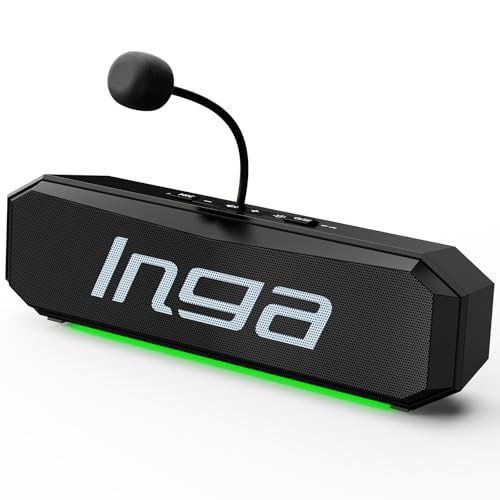
For anyone seeking a versatile audio solution, soundbars offer an ideal choice for enhancing your home entertainment experience. With plug-and-play functionality, you can easily connect them to your TV, gaming console, or streaming device. Many soundbars come equipped with a built-in mic for voice commands and smart home integration, ensuring clear interaction while minimizing background noise. Enjoy immersive surround sound with deep bass and crystal-clear highs, thanks to their advanced speaker design. Plus, user-friendly controls allow you to adjust volume and switch modes effortlessly. Compact and stylish, soundbars fit seamlessly into any living space. Rated 5.0 stars, they’ve received rave reviews for their sound quality and convenience.
Best For: Soundbars are best for movie enthusiasts, gamers, and anyone looking to elevate their audio experience for music and video content.
Pros:
- Versatile Compatibility: Works seamlessly with TVs, gaming consoles, and streaming devices.
- Enhanced Audio Quality: Many feature built-in microphones for clear voice commands and smart integration.
- User-Friendly Controls: Easy to adjust volume and switch modes with intuitive remote or app control.
Cons:
- Limited Mounting Options: Some models may require specific wall-mounting hardware, which may not suit all setups.
- Corded Electric Power Source: Lacks wireless capabilities for power, which can limit placement flexibility.
- Streamlined Design: While space-saving, it may not provide the same audio depth as a full surround sound system.
Factors to Consider When Choosing PC RGB Soundbars
When selecting RGB soundbars for your PC setup, it’s important to consider several key factors. While sound quality is crucial, you should also pay attention to RGB lighting features and connectivity options. Furthermore, consider the size, design, and your budget to ensure you find the ideal soundbar that complements your space.
Sound Quality Importance
Choosing the right RGB soundbar for your PC setup is crucial, as sound quality significantly affects your overall audio experience. Clear sound and rich bass can enhance your enjoyment while gaming, watching movies, or listening to music. Look for a soundbar with a signal-to-noise ratio exceeding 85 dB to ensure clarity and reduce distortion. Models that feature dual drivers and diaphragms can provide a more dynamic audio output compared to those with a single driver. Additionally, consider soundbars with user-friendly volume control options, such as knobs or digital controls, which allow for smooth adjustments without distortion at higher volumes. For casual listening, a 2.0 channel configuration is typically adequate, but if you’re an audiophile, seek out higher fidelity systems that can capture every nuance in your audio experience.
RGB Lighting Options
While RGB lighting may seem like a secondary feature, it can significantly enhance the overall aesthetic and immersive experience of your soundbar setup. When selecting a soundbar, consider the variety of RGB lighting options available. Look for soundbars that offer dynamic, static, or music-sync modes that align with your mood. Multiple RGB effects, such as flowing, breathing, and solid colors, can elevate your listening sessions, whether you’re gaming or watching movies. The ability to adjust intensity and brightness allows for a customized experience, especially in darker environments. Be cautious with touch-sensitive controls; while they add convenience, they may also lead to accidental changes. Thoughtful design elements, like zig-zag patterns or backlit logos, can further integrate the RGB lighting with your audio system, creating a visually stunning atmosphere.
Connectivity Compatibility
To fully enjoy your RGB soundbar experience, it’s crucial to ensure it has the right connectivity options for your devices. Look for soundbars that support multiple connections such as USB, Bluetooth, and the 3.5mm audio jack. This flexibility allows for seamless compatibility with PCs, laptops, and smartphones. Check that the soundbar features Bluetooth 5.0 or higher for enhanced range and stability in wireless connections. It’s also important to verify that switching between wired and wireless modes is straightforward, avoiding any complicated setups. Additionally, evaluate the length of the provided cables, particularly for USB power and audio, to prevent the need for extensions. Finally, check for compatibility with popular operating systems and devices to ensure smooth integration with your tech setup.
Size and Design
The right size and design of a PC RGB soundbar can significantly elevate your audio experience and enhance your workspace aesthetics. It’s essential to select a soundbar that comfortably fits under your monitor or in compact desk areas, typically measuring between 15 to 19 inches in width and 2 to 3 inches in height. A streamlined design not only keeps your setup organized but also allows for effortless integration with other devices. Consider materials such as ABS plastic or aluminum for a modern, durable appearance. Additionally, pay attention to the placement of RGB lighting; opt for features that allow for dynamic or static modes, enhancing your visuals without causing distraction. Lastly, look for an ergonomic design equipped with easy-access controls for volume and lighting adjustments, ensuring user-friendly operation during extended use.
Price Range Considerations
Finding the right RGB soundbar for your PC setup involves more than just size and design; price plays a vital role too. Prices typically range from around $40 for budget models to over $100 for premium options, directly impacting sound quality and features. While budget soundbars may provide basic audio performance, mid-range models often enhance your experience with improved sound and additional functionalities like advanced RGB lighting. Keep in mind that advanced features, such as Bluetooth connectivity, can elevate the price but often justify the investment. Additionally, warranty offerings vary, with lower-priced options typically having limited coverage. Balancing your budget with user reviews is essential, as satisfaction with sound quality and features can differ greatly within the same price range.
User-Friendly Controls
When selecting an RGB soundbar for your PC setup, user-friendly controls can greatly enhance your overall audio experience. Look for intuitive volume knobs and buttons that allow for easy adjustments without needing to navigate complex menus. Touch-sensitive controls can improve usability, but be mindful—overly sensitive controls may lead to accidental changes. One-touch controls for essential functions like mute, play/pause, and audio mode switching can significantly boost convenience. Clear labeling is crucial, especially in low-light environments, so you can quickly identify functions without confusion. Additionally, choose soundbars with plug-and-play functionality for a seamless setup and immediate use—no need for extra drivers or software. Your audio experience will truly benefit!
Audio Performance Ratings
User-friendly controls set the stage, but audio performance ratings are what truly define your soundbar experience. Look for metrics like signal-to-noise ratio (SNR), where higher values, such as 90 dB, indicate clearer audio output. Surround sound configuration ratings, like 2.0 channels, determine the number of audio channels and significantly impact the depth of your sound. User feedback can vary; some soundbars deliver clear audio and rich bass, while others may distort at high volumes. Dual drivers and diaphragms enhance sound quality, making your gaming or multimedia experience more immersive. Finally, check consumer ratings on a 1 to 5-star scale—averages above 4 stars suggest you’ll likely enjoy the audio performance of your chosen soundbar.
Versatility for Use
When choosing a PC RGB soundbar, it’s important to consider its versatility across a variety of devices. Look for models that can connect effortlessly to PCs, laptops, gaming consoles, and smartphones, ensuring adaptability for different scenarios. Prioritize soundbars that offer both wired and wireless connectivity options, such as USB and Bluetooth, providing flexibility in your setup. Features that enhance sound quality, like dual drivers or bass enhancement, can significantly improve your experience whether you’re gaming, watching movies, or enjoying music. Additionally, consider the soundbar’s design to ensure it fits well under monitors or in compact spaces, helping you maintain an organized workspace. Lastly, user-friendly control features, such as volume knobs or touch-sensitive buttons, make it easy to adjust settings during your various activities.







